Featured Posts
Showing posts with label Make Money. Show all posts

Monday, February 2, 2009

_______ Adding Ad units, link units or searchbar to the blog Header _______

First generate the script for your Ad unit, link unit or searchbar in your AdSense Account. Then sign into Blogger Dashboard, select the blog and click LAYOUT. See screenshot below. Click to enlarge:

In the pop-up, select HTML/Javascript, and paste your script there. Then click "Add to blog". If the Page Element is not in the place you want, hover your mouse over the Page Element, drag and drop to whereever you want it.

If you want another page element to contain, for example the link unit, just repeat the process.

BTW, you can actually incorporate both scripts into the same HTML/Javasscript Page Element if you wish.
read more...

Saturday, January 31, 2009

_______ Advertising Networks _______

Hi Blogger... DO you use Adsense?
Oh! great. But what you will do if you get ban in future.
Hey don't worry. Here is the solution.
Oh Here are the solutions.
Here I am giving you the list of advertising networks present which are running successfully in web world....
Here i am giving you 100+ list. But there are 300+ Advertise Networks available but i am giving you the list of those networks which pays Good.

Primarily CPC AND/OR Text Based/Contextual Ad Networks


Primarily CPM Based Ad Networks

Primarily CPA/CPL Ad Networks


Shopping/Comparison Networks

“Non-Standard” Ad Networks (PopUps, Pay Per Post, Expandables, etc.)

Specific Demographic Ad Networks

Specific Demographic Ad Networks (*Adult Network*)

NON-US Primarily CPM Based Ad Networks

NON-US Primarily CPC AND/OR Text Based/Contextual Ad Networks

NON-US Primarily CPA/CPL Ad Networks

If I have missed any please post that link in COMMENT
Thankyou
Enjoy Earning
read more...

Tuesday, July 1, 2008

______Make Google Better with Customize Google for Firefox_______


firefox-google-logo Do you use Google inside Firefox ? If the answer is yes, you definitely need an add-on called Customize Google

that makes your favorite Google even better and all the more useful.


And in case you require some more convincing, here are five unique things you can do with Google and Firefox once you have installed Customize Google:


1. Remove Specific Websites from Google Search Results


Don’t like to see pages in Google results that are from Amazon.com or from domains like .info or .biz. With Customize Google, you can easily filter any websites or domains from Google by specifying rules.


block-websites-google


For instance, *amazon* will not show pages that have amazon in the URL while a rule like technorati.com/tag/* will block pages in search results that are from Technorati search. You can extend this idea to block RSS feeds in Google results.


amazon-google-results


Related: Extremely Useful Firefox Extensions


2. Keep Your Gmail Account Safe


Last year, Rob Graham demonstrated how he could hack Gmail accounts that were using http: instead of https: to access emails.


https-gmail Anyone can forget typing that additional "s" in the URL so a better alternative is to outsource this job to Customize Google.


It will automatically switch you to a more secure https: login screen while you are logging into any Google service including Gmail, Google Docs, Google Reader, Google Calendar and your Google Web History.


3. Clean URLs in Google Search Results


Did you notice the URL for cricinfo.com website appearing in Google results ? Its cricinfo.com prepended with some tracking code.


google-cricket-score


I am not worried about Google tracking clicks on search results but the problem comes when you have to copy links from the search page - they are cryptic URLs and do not look good when put in email messages. Customize Google removes the click tracking so the search results link directly to the website.


4. Number your Search Results in Google


Customize Google can add a counter next to each of your search results in Google.


This feature comes handy if you are tracking the rankings of your web pages in Google over a period of time or if you have 100 search results on a page and want to know the exact position of the web page that you are interested in.


google-search-numbers


5. Search Flickr, CNN, Yahoo, etc from Google


Customize Google adds links to rival search engines in Google search results including Google Images and Google News. This is a big time saver and you won’t realize how useful it is unless you start using this feature.


google-flickr-image-search


So if you are looking for some pictures on Google Images, you will also see links to Yahoo! Image Search and Flickr - no need to type the query again.

read more...

Monday, December 24, 2007

_______Adsense Alternatives When Google Bans Your Account_______

Google recently disabled the Adsense account of John Q. Public for generating invalid or fraudulent clicks.
It has come to our attention that invalid clicks have been generated on the Google ads on your site(s). We have therefore disabled your Google AdSense account. Please understand that this step was taken in an effort to protect the interest of the AdWords advertisers. [from adsense-adclicks@google.com]
His subsequent appeals to Adsense Support were also turned down.

John Q. Public is now looking for alternate revenue streams to monetize his blog and sends us the following questions:

Q 1: Can I get back my Adsense Account ?

There are few cases when previously banned Adsense publishers managed to reinstate their Google account successfully with Google only deducting some amount related to invalid clicks.
Thank you for clarifying your situation. We have reviewed your circumstances and have reinstated your account, effective immediately. Based on the findings of our investigation, we have deducted $30.82 from your account. [from adsense-adclicks-appeal@google.com]
While it is not a bad idea to follow your case with Google, not everyone may be so lucky as Stas or Jason. Generally, the chances of resurrecting your Adsense account are less.

Q 2: If the answer is No, then what's best alternate for adsense.

While Adsense still rules in terms of Ad inventory, there are tons of other advertising programs that can you consider for your blog depending on your niche and demographics. Here are some popular alternatives:

Adsense Alternatives» Yahoo YPN - If you are located in the US, this is probably the best alternative to Adsense. Yahoo Panama is launching on February 5th.

» FeedBurner Ads - Feedburner is probably performing quite very well for a lot of publishers. The ads are CPM in nature and they have decent reporting engine.

» Text Link Ads, Adbrite - You can sell text links on your blog pages using any of these programs. They also let you add advertising in your RSS feeds.

» Kontera, IntelliTXT - These are inline contextual advertising programs that double-underline the keywords. Some users may however find this annyoying since the ad appears in a pop-up window.

» Chitika, Amazon Affiliates - If you are writing a product blog, Chitika may result in good conversion rates - people read the product review on your website and then proceed to these sites for buying the links. Amazon is good for blog that enjoy a fan following and readers buy what you recommend.

Other popular advertising options include Tribal Fusion, Adify, Pheedo and BlogAds depending on your site traffic. [Picture from Flickr]

Q 3: Does Google block the account or the website itself ? Actually I was planning to sell my blog so can the new owner use his own Adsense Account to insert ads in my blog ?

Google generally bans the Adsense account, not the website showing the Google ads. It is however recommended that the "prospective buyer" checks this with Google Adsense Support himself before closing the deal with you. It is very likely that Google will permit him to show ads on your site using his own Adsense account.

Important: Just take care that you don't open another Adsense account with Google using different credentials (like an abbreviated name or a different address) - Google is very likely to discover this activity and they'll will probably ban you again. [Name changed to protect identity]


read more...

Saturday, December 8, 2007

_______Make Money with Bloggerwave_______

Do you have a blog and want to make some extra money? Then bloggerwave gives you the opportunity. Bloggerwave is aiming to be Europes biggest advertsing media on blogs and you can help us grow so more and more jobs will come.

Now you will ask me is this real or scam.....hmmm Every person ask is this scam will they pay and else .... 1st thing bloggerwave is a good site :we can say better than payperpost.
From this site you can easily earn money for you by using your blog.....means you can make money from your blog.

I am also using this site and this site looking too much good for my paypal account.
So i suggest you join www.bloggerwave.com n start earning. Njoy:)
bloggerwave
read more...

Friday, December 7, 2007

_______paypal cheque: money earned from awsurveys_______

read more...

Saturday, August 18, 2007

_______Adsesese Click Cheaters Read It_______

1.Basic clicker cheat
This is a noob. This guy knows almost nothing about web technology or network architecture. He clicks on his ads every time he has chance. It can be a few clicks to hundreds of clicks daily. Most likely he doesn't even read the AdSense Program Policies and Terms and Conditions.

2.Proxy clicker cheat
She knows a thing or two about cookies and IP address. Or she doesn't know, but somehow guessed that if she use the things called anonymizer, Google will not be able to trace her, because her identity is hidden. She may use anonymizer / proxy websites or specialized anonymous software like tor (The Onion Router).

3.Multiple computer clicker cheat
He knows that somehow Google will detect if the clicks are originated from his own computer. So he will try to even out origin of the clicks. He will recruit his friends, family members, relatives, neighbors, his cats, and his dogs on single mission: to click on the ads. He will also click on the AdSense ads when he is using the library computers, or his office workstation.

4.Software clicker cheat
Graduate to the next step is buyers of clickbots / click-bots. These are specialized robot software to click on AdSense ads. It will browse around your websites, clicking on the ads every few minutes. The more advanced ones will cloak the IP address too, so the website seems to be very popular worldwide. To cover the track, this clickbots will browse around the advertisers sites too while continuing its "click quest".

5.Paid-clickers cheat
If you don't like automated things, there is always other option for you. Just pay $50 dollars a month to the professional AdSense clickers. These are groups of highly specialized Internet surfers with office in
the dark rooms in street corners of India, Pakistan, and China, helping AdSense account owner to earn good amounts of money - before the AdSense account is disabled, that is. They will browse around your websites, clicking on the ads every few minutes. Because they use human eyes, they know which ads worth more. And to be more convincing they can click a link or two, or sign up free offers / newsletters on the advertiser sites.

6.Click-rings cheat
Network is power. So says many business gurus. Instead of taking things to their own hand, this people realize that they can join hands with those with similar goals and distribute AdSense clicks among themselves, the so called AdSense click-rings. Joining this click-ring network means that your website address will be made known to members, who will regularly browse the website and click on your AdSense ads. In exchange, you will also browse other members' sites and click on their AdSense ads. The medium used varies. Some click-ring groups use mail-list for communications. Some are using bulletin boards/forum, Yahoo groups, or Usenet. IRC is another popular way. Slightly more
complicated is specialized AdSense exchange software for collecting members website address and displaying others' websites for clicking.

7.Other medium cheat
I have tens of thousands email address on my newsletter subscriber list. If I include AdSense ads on my newsletters, with 5% CTR, I can get a thousand clicks per one email. Not bad. Or I can pay someone to write some useful/nice/funny/cute toolbars or firefox extensions or screensavers that people can download and use for free, and display my AdSense ads there.

8.Visitor cheat
Simply putting "Visit out sponsors" or "Check out the ads above" on your website is cheating. This might not be very clear-cut cheat to some. But Google AdSense program policies has stated clearly,
the only text allowed are "Advertisements" or "Sponsored List"

9.Spam cheat
This is the highest level all click-frauds, the Maestro of Fraudsters. She spams millions of emails regularly, offering to "satisfy your inner needs if you can help me check on the links on my website". Of
course, email is not the only way. What IRC and instant messaging (IM) are for, after all. She will look for unsuspecting victims, offering something too-good-to-be-true "if only they will visit the website
and click on the links".

10.Click-through-rate cheat
Whichever method(s) above used, there is one limiting condition: the CTR(click-though-rate). Any CTR that exceeds certain percentage (probably around 10%) will raise red flag in Google AdSense back room. To lower the CTR, the professional cheaters will create some pages on the same domain that attracts very high traffic. Some interesting freebies will sure do the tricks. AdSense code is pasted there, thus creating a very high page impressions. Whether or not the the ads are clicked does not matter anyway, because they are targeting low paying keyword that does not have much competition. The fake clicks are, of course, on where the big money is, the low traffic pages stuffed with high-paying keywords.

read more...

Thursday, August 2, 2007

_______Do you want to make money online with Adsense on this Site? Yes, you may now own the Google Ad units on this/any blog_______

Do you want to make money online with Adsense on this Site? Yes, you may now own the Google Ad units on this site, this blog and the main site . Two (2) to three (3) Google ad units with high click-throughs (CTRs) are available for you to make money.

As per Adsense TOS, Adsense publishers in good standing may place Google ads on any site. So, you are free to place your Adsense account here. Objective of this program is to try sharing the Adsense revenue on this site in exchange for some referrals that you may bring here.

Just add ?pub=X&cha=X to any of this site's page URL, like the sample URLs below:

Homepage:
http://www.olstuffhere.blogspot.com/?pub=X&cha=X

Sub-page:
http://www.olstuffhere.blogspot.com/adsense-tips-i/?pub=X&cha=X


Replace the X in pub with your 16-digit Adsense publisher ID and the X in cha with your 10-digit Adsense channel for tracking. Adsense ID and channel of the pages where you added those will be replaced with yours. So, clicks on the Google ads will be credited to you.

So, browse the site and copy the URL of the page you like and add your Adsense publisher ID and channel as per the format above. Then, refer the pages or links to your friends or place the URL on your site as an additional content-rich resource to your site visitors. Every click on the Google ads on pages you refer is credited to your Adsense Account.

Keep in my mind, however, that you are solely responsible for your Adsense Account and Google is responsible for tracking and paying your Adsense income on the pages you refer. This blog has no responsibility with your Adsense revenues and activities in any way.
read more...

Tuesday, July 31, 2007

_______Invite Google Adwords advertisers directly_______

Google Adsense publishers can invite Adwords advertisers to advertise on their websites. The "Advertise on this site" link is contained in the Adsense panel. Advertisers clicking on this link are taken to the Adwords sign-up page.

There is a however a downside to this approach. If Google ads system can't find targetted ads for your webpage, there won't be any advertising invitation on that page.

Using some simple HTML code listed below, you can actually add a "Advertise on this site" link to your blog or website even outside a Adsense ad unit. The advertising link can be added anywhere on your website or weblog independent of the location of the adsense panel.


Rembember to replace ca-pub-xxx with your own adsense client ID. The value of referringUrl can either be the location of your homepage or the current webpage's location. I use BlogItemPermalinkURL template tag to use the URL of the current webpage.

Your link should now like something like: Advertise on my website with Google Adwords

I am yet to confirm if this complies with the Google Adsense TOS
read more...

_______How Much Money Do I Make From Adsense & Blogging ?_______

Recently, a lot of people have asked me about how much I earn from this blog and what kind of traffic do I get. The frequency of such questions increased exponentially following the ban of Indian blogs, which in a way, helped in raising blog awareness in India.
Maybe, their interest in my web income and site stats stems from the fact that I quit my regular day job with a software company to become a full time blogger.

Before I discuss my figures and stats, let me share an interesting related story published today on Washington Post [mirror] that talks about a few websites making a fortune with Adsense:

» Andrew Leyden of PodcastDirectory.com receives nearly a million hits and makes around $30,000 to $40,000.

» Freeweblayouts.net owners make $100,000 a month from a site that provides readymade web design templates for MySpace.com

» SeatGuru sites gets 700,000 visitors a month and makes about $10,000 to $20,000 a month from Adsense alone.

OK, back to my numbers. I am not very comfortable revealing the exact earnings data in public but still I will try to share whatever possible:

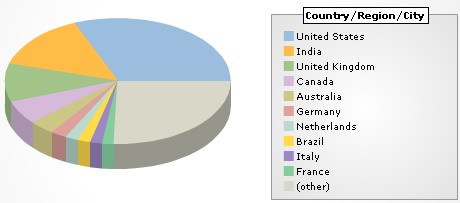
» Digital Inspiration blog gets around 1.25 million hits per month with a majority originating from Google followed by direct traffic (like bookmarks, rss feeds, etc)


» The maximum site traffic comes from four countries - US, India, UK and Australia (in the same order)

» A majority of monthly income is from Adsense but I do make some extra money from Chitika, Feedburner Ads, Direct Advertising and Blog Consulting [via paypal].

» Firefox referrals have also been a good source of revenue though I did not have much success with Picasa software. I never tried Adsense or Adwords referrals.

» While it may be tough for me to write down the actual Adsense earnings data here, you can make some good guesses from the WashingtonPost story mentioned above.

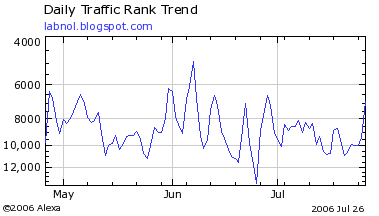
» Alexa Traffic Rank for this blog is 7,637.

Alexa Rankings

» Google Blogger Team added Digital Inspiration to Blogs of Note on July 25, 2006.

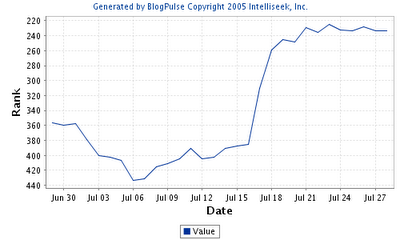
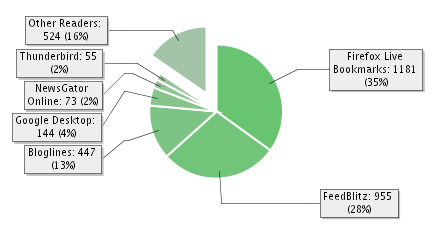
» Technorati, which tracks 50 million blogs, rank this site at number 936 while the BlogPulse Rank is 233. Also, ~4500 users have subscribed to the XML Feeds [Feedburner+Atom].


Copied from labnol.
read more...

_______Adsense Alternatives When Google Bans Your Account_______

Google recently disabled the Adsense account of John Q. Public for generating invalid or fraudulent clicks.
It has come to our attention that invalid clicks have been generated on the Google ads on your site(s). We have therefore disabled your Google AdSense account. Please understand that this step was taken in an effort to protect the interest of the AdWords advertisers. [from adsense-adclicks@google.com]
His subsequent appeals to Adsense Support were also turned down.

John Q. Public is now looking for alternate revenue streams to monetize his blog and sends us the following questions:

Q 1: Can I get back my Adsense Account ?

There are few cases when previously banned Adsense publishers managed to reinstate their Google account successfully with Google only deducting some amount related to invalid clicks.
Thank you for clarifying your situation. We have reviewed your circumstances and have reinstated your account, effective immediately. Based on the findings of our investigation, we have deducted $30.82 from your account. [from adsense-adclicks-appeal@google.com]
While it is not a bad idea to follow your case with Google, not everyone may be so lucky as Stas or Jason. Generally, the chances of resurrecting your Adsense account are less.

Q 2: If the answer is No, then what's best alternate for adsense.

While Adsense still rules in terms of Ad inventory, there are tons of other advertising programs that can you consider for your blog depending on your niche and demographics. Here are some popular alternatives:

» Yahoo YPN - If you are located in the US, this is probably the best alternative to Adsense. Yahoo Panama is launching on February 5th.

» FeedBurner Ads - Feedburner is probably performing quite very well for a lot of publishers. The ads are CPM in nature and they have decent reporting engine.

» Text Link Ads, Adbrite - You can sell text links on your blog pages using any of these programs. They also let you add advertising in your RSS feeds.

» Kontera, IntelliTXT - These are inline contextual advertising programs that double-underline the keywords. Some users may however find this annyoying since the ad appears in a pop-up window.

» Chitika, Amazon Affiliates - If you are writing a product blog, Chitika may result in good conversion rates - people read the product review on your website and then proceed to these sites for buying the links. Amazon is good for blog that enjoy a fan following and readers buy what you recommend.

Other popular advertising options include Tribal Fusion, Adify, Pheedo and BlogAds depending on your site traffic. [Picture from Flickr]

Q 3: Does Google block the account or the website itself ? Actually I was planning to sell my blog so can the new owner use his own Adsense Account to insert ads in my blog ?

Google generally bans the Adsense account, not the website showing the Google ads. It is however recommended that the "prospective buyer" checks this with Google Adsense Support himself before closing the deal with you. It is very likely that Google will permit him to show ads on your site using his own Adsense account.

Important: Just take care that you don't open another Adsense account with Google using different credentials (like an abbreviated name or a different address) - Google is very likely to discover this activity and they'll will probably ban you again. [Name changed to protect identity]
read more...

Monday, July 30, 2007

_______see ctr[adsense]_______


What you think. Is this real proof or just a fake?
How much ctr we want means low or high .
I am totaly confused.
read more...

Saturday, July 28, 2007

_______Referrals 2.0 launches to all AdSense publishers_______

While some of you may already be familiar with referrals for Google products, this launch will greatly expand the inventory and functionality of referrals for AdSense publishers. Below we've highlighted a few of the key benefits of referrals 2.0:
  • Expanded product inventory: While many of you have had success referring one of our Google products, some of you weren't able to find a product that fit the context of your site. Referrals 2.0 offers products from thousands of AdWords advertisers, so you can find the right ads for your sites.

  • Category and keyword targeting: With thousands of products available, it can be difficult to decide which ads will perform best on your site. That's why we give you the option to refer products by category and keyword. You can narrow down the types of ads you want to display and let AdSense figure out which ones will perform best on your site. Whether you want ads for a specific category, advertiser, or product, referrals 2.0 will give you the control to decide.

  • Ad unit optimization: It can be tricky picking the best ads for your site, so we've included ad unit optimization for referrals. When you create a new referral ad unit, simply select the Pick best performing ads option. We'll then compare your selected ads to other relevant ads, and serve the ads we expect to perform best on your site.

  • Better targeting for pages with multiple themes: With standard contextual targeting, ads may not match up directly with the text around them if there are a number of themes on the page. With referrals, you can select unique “keywords” for each ad unit to narrow the targeting directly to the theme you want. Better targeting means higher earnings for your site.

  • Greater compensation for high-quality traffic: Since referrals are paid on a cost-per-action (CPA) basis, your traffic matters. If the traffic you send to advertisers is more likely to turn into a completed sale or lead, you will earn more with referrals.

  • Add your seal of approval: Unlike AdSense for content ads, our program policies allow you to make specific references to referral ads on your site. If you endorse the product that you are referring, feel free to let your users know. By adding your personal review of the products you refer, you can help your users make more informed choices.
To get started with referrals, click the AdSense Setup tab in your account, then click Referrals. If you don't see referrals 2.0 right away, please check back in a few days, as the feature will gradually become available in all accounts over the next few weeks. Please also keep in mind that for some languages, advertisers are just getting started so ad inventory may be limited at this time. We encourage you to check back frequently to see new offers.

[[[[[ MY REFERRAL 2.0 ACTIVATED AFTER $5 AND OF MY FRIEND AFTER $6.39]]]]]

[[[[[[[[I GOT THERE MESSEGE IN TIPS THAT R2.0 IS ACTIVATED]]]]]]]]

UPDATE: Clarified that referrals 2.0 is currently only available in referrals-supported languages


read more...

Friday, July 27, 2007

_______Adsense Tips, Layout Optimization Tricks for Higher CTR_______

Google Adsense is perhaps the easiest way to attract advertisers from across the globe to your blog. Just submit your blog to Google for approval. If Google likes what it sees, it will place contextual ads linking to products likely to appeal to the readers. Each time a reader clicks a link, the advertiser pays Google a small fee, and Google splits that with you.

The next interesting question - How to Make Money with Google Adsense ? Here are The best Google Adsense Tips and Tricks for making more money (profit) from Google adsense program.

a. Strictly follow the rules mentioned in Adsense policies. You will always earn more revenue from Adsense by playing it clean.

b. Never modify the Google Adsense HTML code.

c. Don't ask your friends or visitors to click on your Google ads. Do not include incentives of any kind for users to click on ads. Don't label the Google ads with text other than "sponsored links" or "advertisements.".

d. Don't click on your own ads - Google is much smarter than you think. You should not reload your pages excessively. If you are testing your website layout with Google adsense, follow some precautions. Or you can use the unofficial Google Adsense Sandbox Tool that is accessible from Firefox, IE and other browsers to see what kind of Google ads will be served based on content (website address URL) or keywords.

e. Don't place ads in pop-up windows, error pages or even empty pages.

f. Don't start a "adsense asbestos" or "home equity loan rates" website merely to make money from accidental clicks (accidence). You will never make money out these "made-for-adsense-only" websites. Instead, write on topics what you are passionate about. Don't waste your money on high-paying adsense keywords lists.

g. For short articles, CTR is best when ads are placed just above the content

h. For long articles, CTR improves if ads are placed somewhere in middle of the content - visitors read the long content and then they are looking for more resources.

i. Use Text Ads instead of Image Ads as users get more options. If you still want to display image ads, consider ad formats that support image ads - Choose either the 300x250 medium rectangle or the 160x600 wide skyscraper - or both, if you display multiple ad units on a page.

j. Google Ads without background color and borders always perform better. Make the border color and background color same as your page background color.

k. Always put ads above the main fold. Make sure that the ad unit with the highest clickthrough rate is the first instance of the ad code that appears in the HTML. Since the first ad unit is always filled before the rest, you want to make sure that ad unit is located in the best placement on your page.

l. Try setting the ad link URL color to a lighter shade. If your text is black, you may make the adlink as light gray.

m. Go Wide - The large rectangle is the best paying adsense format (336x280) - The Google Adsense Publisher team also feels that the best formats are the wider ones - the ad formats that contain the widest individual ads. Try using the 336x280 large rectangle, 300x250 medium rectangle, or 160x600 wide skyscraper.

n. Placing images next to ads or above ads does help in attracting user attention.

o. Blend AdLinks with other navigation links or place horizontal adlinks at the top of your webpage. AdSense publishers are permitted to click on link unit topics on their web pages, provided that they do not click on any Google ads on the resulting page.

p. Organize an Adsense Party for your friends and colleagues - Request them to navigate your website, watch their activity - it will provide vital clues about which regions on your website draw more user attention. Try putting ads near those areas. (Thanks Darren)

q. You can put upto 3 adsense units on a page. Try putting a large skyscraper on the right navigation sidebar of your website. That area is close to the browser scrollbar. You can also add 2 AdSense for search boxes, 1 adlink unit and 1 referral button per product (i.e., 1 AdSense referral button and 1 Firefox plus Google Toolbar referral button).

r. The first few lines of your content are an important factor for determining what Ads are served on your webpage. That's the right place to put keywords in bold (strong or &ltb> tags) or header tags (h1, h2, etc).

s. Always select the setting to open Google Adsense search box results in a new browser window, so you won't lose your visitors. Click the Open search results in a new browser window checkbox and this add target="google_window" to your form tag.

t. Maximum people think the search box is on the top right corner. So you know where to put it.

u. Don't syndicate full content. If people can read everything from the newsreader window itself, why would they visit your website where your ads are.

v. Use URL channels to determine performance of individual pages. I track my most popular pages with Google Analytics, Statcounter and create a channel for each of the URL. You can even track Adsense Clicks with Analytics

w. For low CTR pages, try changing titles or adding more content to get better focused ads

x. Block low paying advertisers with Filters. Why to loose a visitor for 0.01 cents. Use Overture or Google Adwords Keywords tool to discover keywords that are less popular with advertisers.

y. The AdSense for search Top Queries report shows you what your users are looking for, by listing the 25 most common searches conducted through your AdSense for search boxes. Use this report to identify additional topics to add to your site, or to keep track of your most sought-after information. Focus and improve that content.

z. Not everyone has a RSS reader. Use RSS to Email services like FeedBlitz, Bloglet or Rmail to let users subscribe to your blog by email.

Remember, you are the best judge when it comes to choosing ad formats. Even Google doesn't offer the best advise always. For instance, in the visual heat map, Google suggests that webmasters are best served by positioning ads on the upper left-hand side of a Web page. But on the Google homepage, you will find ads on the far right.

AdSense is one of the best tools you can use to draw dollars to your site. Remember that there is no easy way to make money on Adsense... it takes a lot of work. Adsense publishers on blogspot.com can integrate Adsense directly from Blogger Interface.

Yahoo Publisher Network YPN and Chitika eMiniMalls offer interesting Adsense alternatives. You can use this free online Sandbox tool to compare Google Adsense, Chitika eMiniMalls and Yahoo Publisher Network (YPN) Program.

Enter any keywords or a website address (URL), choose a geographic location (for Google), customize ad colors or choose from an existing color set and click "Udate Ads Display". You can try the Adsense, YPN or Chitika Services without signing up for any of these services.
read more...